Quick answer: An API (Application Programming Interface) is a set of rules that lets two software systems exchange data without either knowing how the other is built internally- a client sends a request, the API carries it to a server, and the server returns a response. In software engineering, APIs are what connect mobile apps, web platforms, payment systems, and AI services into working products.
The definition is the easy part. The decisions are what determine whether a product ships fast or stalls: which API in software engineering fits the traffic, how the architecture holds up under scale, what a wrong call costs you six months in.
According to Postman’s 2025 State of the API Report, 74% of organizations now take an API-first approach and 62% work with APIs that directly generate revenue. APIs have moved from back-end plumbing to business strategy and that shift is the lens for everything below.
This guide covers how those choices play out in real projects written for founders scoping an MVP, engineers picking an architecture, and teams deciding between REST, GraphQL, gRPC, and the rest.
Ready to kick start your new project? Get a free quote today.
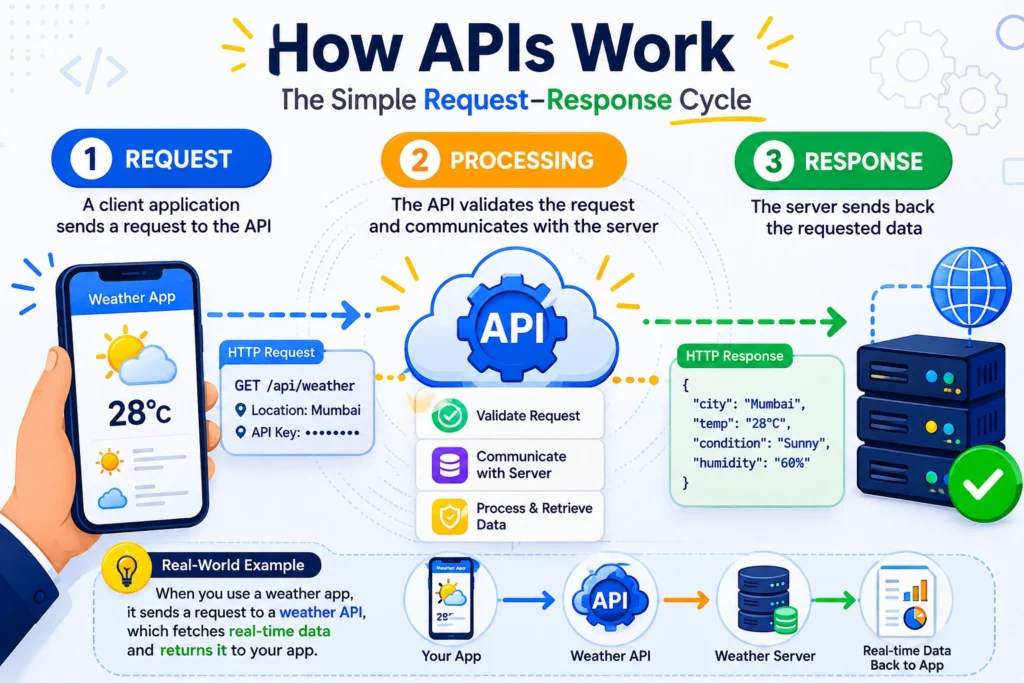
Request : A client application sends a request to the API
Processing : The API validates the request and communicates with the server
Response : The server sends back the requested data
For example, when you use a weather app, it sends a request to a weather API, which fetches real-time data and returns it to your app.
Watch this quick video to understand how APIs work in software engineering
How We Use APIs on Real Projects (Expert Insight)
At Quickway Infosystems, API design is part of nearly every product we ship 100+ products delivered, 5.0 on Clutch and the lessons below come from builds, not textbooks. A few representative projects details are shown below:
Case study 1- Custom e-commerce platform: 35% faster checkout
The problem: A growing online retailer was losing customers at checkout due to a slow, multi-step payment flow built on a dated integration.
What we did: We re-architected the checkout around the Stripe API, adding real-time transaction processing, automated invoicing, and saved-payment support. Critically, we handled payment-status updates through Stripe webhooks rather than polling so the system reacts the moment a payment clears instead of checking on a timer.
The result: Checkout completion time dropped by roughly 35%, invoicing became fully automated, and the support team stopped manually reconciling failed payments.
The lesson: The win came from an architectural choice (event-driven webhooks over polling), not from the payment provider itself.
Case study 2 – Logistics platform: real-time delivery tracking
The problem: A logistics operator had no live visibility into deliveries, driving constant “where’s my order?”
What we did: We integrated the Google Maps API for live location and routing, then exposed it through a clean internal REST API that fed both the customer app and the dispatcher dashboard from one source of truth.
The result: Dispatchers gained real-time fleet visibility, customers got accurate ETAs, and delivery-status support volume fell noticeably.
The lesson: Wrapping a third-party API in your own internal API gave us one place to control caching, rate limits, and cost instead of every client calling Google directly.
Case study 3 – Scaling SaaS product: monolith to microservices
The problem: A scaling SaaS product was straining under a single monolith – one slow feature degraded the entire app.
What we did: We split the system into independent microservices communicating over REST and gRPC, fronted by an API gateway handling auth and rate limiting.
The result: Teams could deploy features independently, high-traffic services scaled on their own, and release risk dropped.
The lesson: We used gRPC for fast internal service-to-service calls and kept REST at the public edge matching the protocol to the job rather than standardizing on one.
The common thread: In every case the business outcome was faster checkout, fewer support calls, safer releases that came directly from deliberate API design, not from the framework or language.
Common API Mistakes We See (and How to Avoid Them)
Most of these don’t show up at launch. They show up three months later, when the API is in production and something breaks. These are the ones we run into most often when we inherit or audit existing systems.
No versioning strategy. The API ships, external clients integrate, and then a “small change” breaks all of them at once.
Fix: version from day one (/v1/), and treat deprecation as a planned, announced event with a timeline never a surprise.
Leaking internal errors to clients. Returning raw stack traces or database errors is both a security risk and a debugging nightmare for whoever’s consuming the API.
No rate limiting. Without it, one buggy client or one bad actor can take the whole system down.
Fix: rate-limit at the gateway before it’s a problem, not after an incident.
Chatty APIs (the N+1 problem). Designs that force the client to make ten calls to render one screen are slow and expensive at scale.
Fix: design endpoints around what the client actually needs, or use composite endpoints / GraphQL where it genuinely helps.
Documentation as an afterthought. Undocumented APIs mean every integration becomes a support ticket.
Fix: write the docs as you build, not as cleanup. If it’s not documented, assume it doesn’t exist.
No monitoring in production. You can’t fix what you can’t see. Teams often have zero visibility into latency, error rates, or who’s calling what.
Fix: instrument latency, errors, and usage from launch an API under stress shows up in the metrics first.
The pattern behind all six: They are cheap to prevent during design and expensive to fix in production. That’s exactly the gap experience closes and it’s why we design for these from the first endpoint rather than patching them in later.
Why API Decisions Are Business Decisions
If you’re funding or scoping a product, this is the section that matters. APIs aren’t just a technical convenience, they are a lever on speed, cost, and revenue.
The pattern is consistent: Companies that design APIs well launch faster, form partnerships more easily, and scale without adding headcount.
Where that value actually shows up:
Faster, cheaper delivery. Teams reuse proven APIs (payments, maps, messaging, AI) instead of rebuilding them. Postman found 63% of teams can now ship an API in under a week, up from 47% a year earlier.
New revenue and partnerships. A well-designed API turns your product into a platform others build on the model behind payment processors, travel aggregators, and SaaS ecosystems.
Scalability without rewrites. APIs make microservices possible, so you scale the busy parts of a system independently instead of scaling one giant monolith.
One back end, every platform. Build the logic once and serve web, iOS, and Android from it.
The blunt version for decision-makers: API quality is product quality. Cutting corners on API design is one of the most expensive forms of technical debt a growing business can take on it surfaces later as slow features, broken integrations, and rewrites.
Choosing the Right API Type: A Decision Framework
This is the call your engineering team actually debates. The definitions are easy to find anywhere; the judgment is what’s worth reading. Here’s how we decide, and when each option earns its place.
Approach
Reach for it when
Avoid it when
REST
You need a public API or a standard web/mobile back end; cacheability and broad familiarity matter
Clients need many different data shapes and you’re over or under-fetching constantly
GraphQL
Data-heavy, mobile-first front ends need precise, flexible queries across many types in one request
Simple resource access- the setup and caching complexity isn’t worth it
gRPC
Fast internal microservice-to-microservice traffic where speed beats human readability
Browser-facing or public APIs, it’s not natively browser-friendly
SOAP
Banking, payments, or enterprise systems where built-in security and transaction compliance are mandatory
Anything new and lightweight, it’s verbose and heavy to maintain
Webhooks
You need event notifications pushed instantly (payment cleared, build finished)
You need complex two-way querying – webhooks are one-directional
How we actually decide: REST is our default at the public edge because it’s predictable and cacheable. We add GraphQL when a front end is genuinely starving for flexible queries not before. We use gRPC inside the system for service-to-service speed.
And webhooks wherever “tell me the moment X happens” beats “ask repeatedly if X happened.” The mistake we see most: Teams standardizing on one protocol everywhere instead of matching it to the traffic.
API Security: Where Real Systems Get Hurt
Because APIs expose data and functionality, they’re a prime target and the gaps are often basic. Postman’s 2024 report found 27% of organizations still don’t use dedicated key-management tools, exactly the kind of opening attackers look for.
The practices that actually protect a production API:
Authentication – Verify who is calling (OAuth 2.0, API keys, JWTs).
Authorization – Control what each caller can do (least privilege).
Encryption – HTTPS/TLS everywhere, no exceptions.
Rate limiting & throttling – Stop abuse and traffic spikes from taking the system down.
Input validation – Never trust incoming data; validate everything to block injection.
API gateways – Centralize auth, rate limiting, logging, and routing in one layer.
Monitoring & logging – An API under attack usually shows up in the logs first.
For a deeper treatment, see our guide on secure web application best practices.
API Documentation: The Underrated Success Factor
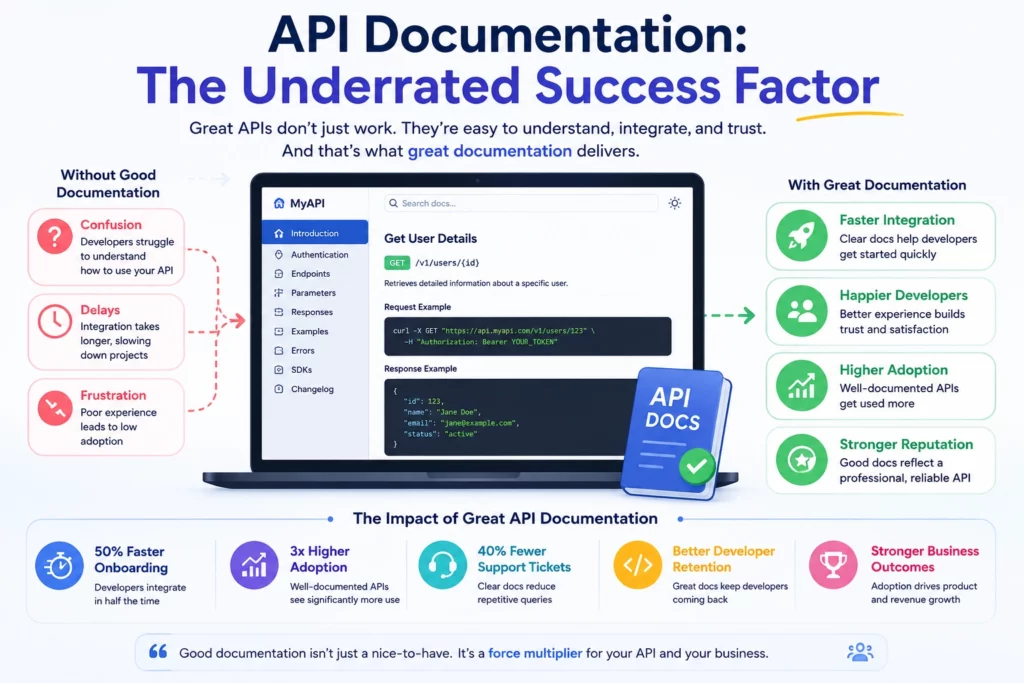
Here’s what most guides skip entirely: an API is only as good as its documentation. Postman’s research found inconsistent docs are one of developers’ biggest roadblocks, and that nearly half resort to reading source code just to understand how an API works.
Good documentation lets new developers (internal or partner) become productive immediately, cuts support requests, and directly drives adoption- easy docs mean more people actually use the API. The gold standard is Stripe’s documentation: Every endpoint explained in plain language, every parameter listed, copy-paste request and response examples right alongside. Tools like Swagger/OpenAPI, Postman, and ReadMe help you get there. If anyone outside your team will touch your API, treat docs as a first-class deliverable, not a cleanup task.
How APIs Are Used in Engineering: Real Use Cases
“How can APIs be used in engineering?” – the patterns that show up again and again in real builds:
Payment processing – Stripe, PayPal, Razorpay handle transactions so you never touch raw card data.
Authentication / social login – Google and Facebook OAuth let users sign in without a new password.
Maps & navigation – Google Maps API for location, routing, and real-time tracking.
Messaging & notifications – Twilio (SMS/voice) and the WhatsApp Business API at scale.
AI integration – OpenAI and similar add language, vision, and reasoning without training your own models.
Internal microservices – your own services talking to each other through private APIs.
WhatsApp Business API: operational gotchas
Because “whatsapp api best practices” is a frequent query and it trips teams up: the WhatsApp Business API is template-based for outbound messaging, requires pre-approved templates, and enforces a 24-hour customer-service window for free-form replies. In practice: get explicit opt-in, keep templates compliant or your quality rating (and deliverability) drops, use it for transactional value rather than spam, and always handle delivery webhooks so you know message status in real time. The 24-hour window is the detail most teams miss until messages start failing.
The 2026 Shift: APIs Built for AI Agents
The biggest current change in API design isn’t a new protocol – it’s a new consumer. APIs are increasingly called by autonomous AI agents, not just humans. Agents parse your documentation, reason over parameters, and fire requests without waiting for confirmation, at machine speed and in parallel.
Most production APIs were never designed for this. What it changes in practice: contracts need to be clearer and stricter, error messages need to be machine-interpretable, validation can’t assume a careful human on the other end, and rate limits have to account for traffic patterns no human would ever generate. The upside is that designing for agents i.e clear contracts, well-defined errors, realistic examples makes APIs better for human developers too.
Alongside this, the other live trends: AI-powered APIs (exposing AI capabilities as a service), serverless APIs (auto-scaling infrastructure), and event-driven/real-time APIs (webhooks, streaming, WebSockets). The direction is clear that APIs are becoming the primary interface not just between apps, but between businesses and increasingly, AI systems.
The Fundamentals, Briefly
If you’re newer to the topic, here’s the essential reference , kept short on purpose, since the value above is in the judgment, not the definitions.
How an API works. Three steps: a client sends a request to an endpoint (usually over HTTP), the API validates and processes it, and the server returns a response (commonly JSON) with a status code. Open a weather app and it requests data from a weather API, which returns the forecast in seconds- your app never stores or builds that data itself.
The main types at a glance.By how they’re built: REST (the ~90%+ default, HTTP + JSON), GraphQL (client asks for exactly the data it needs), SOAP (older, XML, enterprise-grade security), gRPC (fast internal calls via Protocol Buffers), and webhooks (event-driven push). By who can use them: open/public, partner, internal/private, and composite (bundling several calls into one).
API vs Web Service vs SDK. An API is any interface for software-to-software communication. A web service is an API that specifically works over a network (all web services are APIs; not all APIs are web services). An SDK is a full toolkit that often contains an API. (On “API or PSI which is better” that’s usually a mix-up: PSI/PageSpeed Insights is a performance tool, not an API alternative; if you meant SDK, see above.)
Monolith vs microservices. A monolith packs everything into one app i.e simple to start, hard to scale. Microservices split it into independent services that talk through APIs – the modern default for systems built to scale. SOA is the older enterprise predecessor.
API lifecycle. Design (contract first, often OpenAPI) → develop → test → deploy (behind a gateway) → monitor → version & deprecate with notice. Designing the contract first lets front-end and back-end teams build in parallel – the core idea behind API-first development, now used by 74% of organizations.
What “API development” means. The end-to-end process of designing, building, testing, securing, documenting, and maintaining APIs- the work that turns a pile of services into a coherent, extensible product.
What Makes an API Cheap or Expensive to Build
When we scope a product, the API layer is often where effort hides. There’s no single answer to “how much work is this” as it tracks scope but a handful of factors reliably separate a quick integration from a months-long one. Knowing them upfront is how you avoid a budget surprise later.
Number and complexity of endpoints. A list of 20 endpoints isn’t a spec, it’s a starting point. Each one carries hidden decisions about data structure, error handling, and side effects. This is the single biggest source of underestimation.
Custom vs third-party. Wrapping a proven service like Stripe or Twilio is fast. Building bespoke logic design, development, testing, docs is where effort climbs.
One-way vs two-way sync, and real-time. Live, bidirectional data needs far more infrastructure, error handling, and monitoring than a nightly one-way pull.
Security and compliance. OAuth 2.0, SSO, audit logging, and regulated-industry requirements (finance, healthcare) all add engineering time.
Documentation and testing. If they aren’t scoped in, they aren’t being built. Bolting documentation onto a finished 30-endpoint API is a week of avoidable rework.
One red flag worth knowing: Any estimate priced purely on endpoint count almost always expands later, because the scope was incomplete from the start. Real scoping covers the endpoints.
Conclusion
APIs are the foundation of modern software engineering, but the part that separates a shipped product from a stalled one isn’t knowing what an API is – it’s the decisions around it: the right protocol for the traffic, security that holds up, documentation people can use, and architecture that scales. The companies that treat those as strategic choices rather than technical afterthoughts are the ones moving fastest.
If that’s the kind of product you’re building, strong API design is where it starts.
Frequently Asked Questions
What is an API in software engineering?
An API (Application Programming Interface) is a set of rules that lets different software applications communicate and exchange data without exposing each other’s internal code. A client sends a request, the API carries it to a server, and the server returns a response making applications more modular, scalable, and secure.
How can APIs be used in engineering?
APIs are used for payment processing (Stripe), social login (Google/Facebook OAuth), maps and navigation (Google Maps), messaging (Twilio, WhatsApp Business API), AI features (OpenAI), real-time tracking, and internal microservice communication letting engineers add powerful functionality without building it from scratch.
What are the main types of APIs?
By architecture: REST, GraphQL, SOAP, gRPC/RPC, and webhooks. By access: open/public, partner, internal/private, and composite. REST is the most widely used; GraphQL suits data-heavy front ends; gRPC fits fast internal microservice calls.
What is the difference between an API and a web service?
All web services are APIs, but not all APIs are web services. A web service communicates specifically over a network, while an API is the broader concept and can also work locally. An SDK is different again – it’s a full toolkit that often contains an API.
What is API-first development?
API-first development means designing the API contract before building the application, so teams can work in parallel and integrations stay consistent. As of 2024, 74% of organizations report taking an API-first approach.
What is a real example of an API?
The Google Maps API (maps and navigation), Stripe API (payments), Twilio API (messaging), and “Sign in with Google” (OAuth) are all APIs you likely use daily without realizing it.
Co-Founder & COO at Quickway Infosystems | Digital Strategy & Emerging Technology Leader | 12+ Years of Experience
Rahul oversees operational strategy, client delivery, and technology adoption initiatives across Quickway Infosystems engagements. He works closely with startup founders and enterprise teams to plan and implement workflow modernisation, process automation, and AI-enabled business systems.
His core expertise lies in technology adoption planning, helping businesses transition from legacy processes to scalable digital infrastructure without disrupting day-to-day operations. He has contributed to 30+ client transformation initiatives involving workflow automation, operational integration, and system modernisation across healthcare, education, insurance, and enterprise SaaS.
His content focuses on the operational and technology decisions that determine whether a digital transformation project delivers results or stalls after go-live.
Most founders budget for AI development. Very few budget accurately for the operating systems and services required to run an AI product after launch. Development